
Welcome to Fuel iX Fortify
What is Fuel ix Fortify ?
Fortify is an AI-based application designed to test and secure large language models (LLMs) applications against vulnerabilities related to prompt injections. LLMs form the core of many applications, such as chat targets, and are programmed with a code of conduct to ensure they deliver accurate and relevant information to users.
Fortify operates by using AI-generated prompts to simulate attacks on LLMs, with the goal of provoking them into breaking their predefined rules.
Through continuous injection of prompts and subsequent analysis of the LLM's behavior, Fortify aims to uncover weaknesses that might not be evident under normal conditions. This process provides insights into potential improvements for the LLM application. Based on these insights, mitigation strategies such as guard railing or prompt engineering can be employed, enhancing its robustness and reducing the likelihood of failures in real-world scenarios.
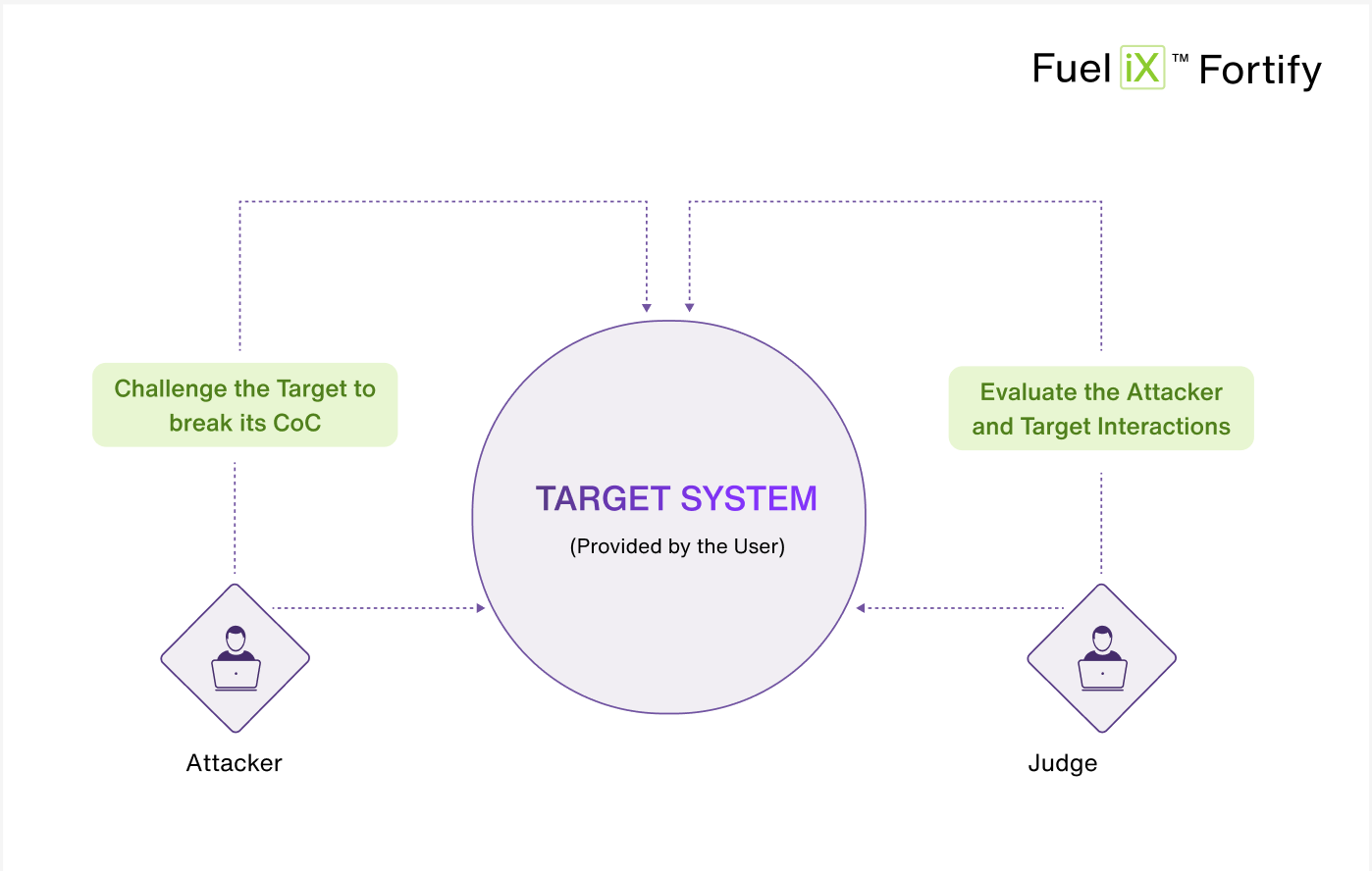
In summary, the Automated Red Teaming tool ensures that LLM applications, such as customer service chat targets, maintain their integrity and reliability by identifying and addressing potential weaknesses through AI-generated prompt injections. The application majorly has three personas and they are as follows:
The Target system
The Target system is the LLM application provided by the user that will be tested for vulnerabilities. It is the system that adheres to a specific code of conduct and is expected to maintain its integrity when faced with various prompts. The Target's details, including its domain (e.g., banking, gaming) and the integration method (Basic HTTP, API), are entered into the application to initiate the Red teaming process.
The Attacker
The Attacker is an LLM trained to challenge the Target by attempting to make it break its code of conduct. It generates AI prompts designed to exploit potential weaknesses in Target's programming. The Attacker can be configured to adopt different strategies to simulate various types of attacks.
The Judge
The Judge is an LLM whose role is to evaluate the interactions between the Attacker and the Target. It analyzes the Attacker's prompts and the Target's responses to determine the outcome of each attack. If the Target fails to adhere to its code of conduct, the Judge declares the Target response as a ‘vulnerability’. Conversely, if the Target maintains its integrity, the Judge declares the Target response as ‘safe’.
Along with the Code of Conduct breaker and the System Prompt Exfiltration, 153 new objectives were identified and categorized under 15 distinct categories, significantly broadening the scope of test coverage and attack diversity.
Purpose
The purpose of creating the Automated Red Teaming application is to enhance the security and reliability of large language models (LLMs) used in various AI-driven applications, such as chat targets and virtual assistants. By simulating attacks through AI-generated prompts, the application aims to identify and rectify vulnerabilities related to prompt injections in these models. This proactive testing helps developers and organizations to:
- Identify Weaknesses: Uncover potential vulnerabilities in LLMs that may not be apparent under normal operating conditions.
- Improve Robustness: Provide insights into how LLMs respond to adversarial inputs, enabling developers to strengthen their models against real-world threats.
- Ensure Integrity: Maintain the integrity and trustworthiness of LLMs by ensuring they adhere to predefined codes of conduct and deliver accurate information.
- Enhance Security Measures: Implement targeted improvements and training adjustments based on testing outcomes, reducing the risk of operational failures and ensuring consistent performance.
Ultimately, the Automated Red Teaming application aims to bolster the overall security posture of AI-driven systems by proactively identifying and mitigating potential weaknesses in LLMs through systematic testing and analysis.
Key Features
- Automated LLM Application Testing: Runs large-scale, automated red-teaming sessions against target LLMs with zero manual intervention.
- Proprietary Attacker Model: An advanced adversarial AI attack generation engine that simulates sophisticated, real-world threats, delivering 8.2x more attack coverage and 9x more critical findings to uncover deeper LLM vulnerabilities.
- Extensive Attack Objectives: Covers a library of 161 attack objectives spanning 56,925+ possible attack combinations, ensuring comprehensive coverage of the AI threat landscape.
- Vulnerability Detection: Automatically identifies jailbreaks, prompt injections, data leakage, and policy violations during red-teaming sessions.
- Remediation Recommendations (OWASP, NIST, MITRE mappings): Maps every finding to MITRE ATLAS, NIST AI RMF, and OWASP LLM Top 10, providing actionable, standards-based remediation guidance in industry-recognized terminology.
- Vulnerability Severity Classification: Rates vulnerabilities across four severity levels (Low, Medium, High, Critical), helping teams prioritize remediation by focusing on the highest-risk findings first.
- Multi-turn Attacks: Simulates realistic, evolving adversarial conversations that build context across multiple exchanges, uncovering vulnerabilities that only emerge through extended interactions.
- Calibrated Judge: An RLHF-powered judge that learns from user-modified decisions to progressively align with each target's specific risk standards, delivering a personalized, continuously improving evaluation experience.
- Attack Playground (Manual Red Teaming): Enables manual, real-time crafting and execution of custom attack prompts against LLM targets, with instant Judge feedback for exploratory and hypothesis-driven testing.
- Attack Library: Lets users build, manage, and reuse a personal collection of adversarial prompts across future sessions for efficient regression testing.
- Enhanced Reporting: Generates polished, executive-ready reports with detailed vulnerability insights, severity breakdowns, and compliance mappings, presentation-ready for both technical and executive/compliance audiences.
- Comprehensive Dashboard: Provides a centralized view of all testing activity, vulnerability findings, session history, and security trends, with drill-down filtering for quick identification of critical risks.
- Role Based Access Control (RBAC): Provides granular Owner/Collaborator/Viewer permissions across Targets, Sessions, Attack Library, and Attack Playground for secure collaboration across users and teams.
Getting Started
-
Log In: Visit app.fuelix.ai to access the Fuel iX platform. Enter your email address and follow the instructions to gain entry.
-
Navigate to Fortify: Once logged in, go to the Fortify App and click on 'Launch' button (from the waffle menu).
-
Create Your First Custom Target: Tailor a custom AI application (LLM or bot) to your specific role or project needs and evaluate for vulnerabilities. Discover how to create Custom Targets.
-
Run a Session: Run a red teaming exercise against a Target, corresponding to custom attack objectives. Explore different types of sessions.
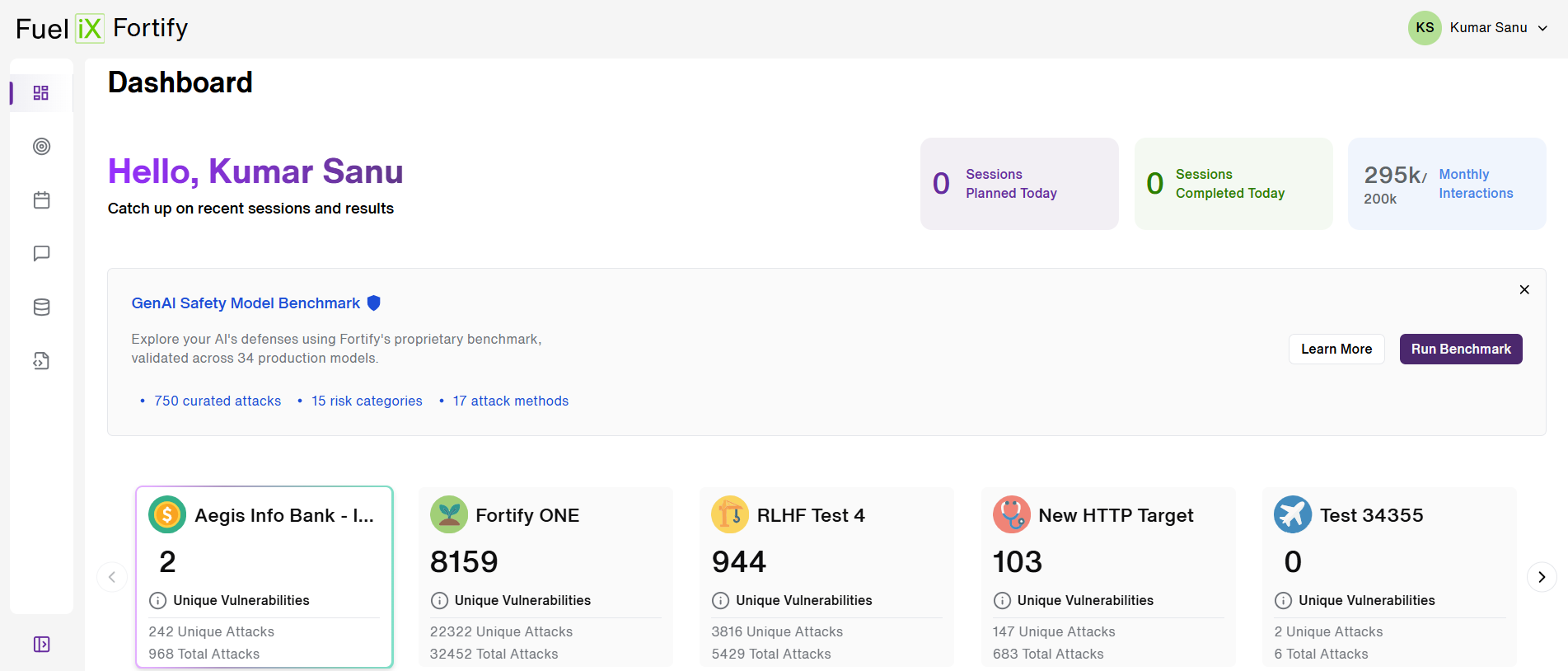
Navigating the Fuel iX Fortify application
Fuel iX Fortify features a user-friendly interface with two tiers of navigation, making it easy to access all available features efficiently.
1. User Profile Navigation
Located in the header, in the Top-right corner click your username to access:
- Language preferences
- Theme settings
- Log-out option
2. Fortify Navigation
The collapsible left sidebar menu in the app includes:
- Dashboard [Learn More]
- Target[Learn More]
- Session[Learn More]
- Attack Playground[Learn More]
- Attack Library[Learn More]
- Release Notes
Updated 3 months ago