
Getting Started: Agents
Log In to Agent Trainer
To log in to Agent Trainer, follow these steps:
- Navigate to https://agent-trainer.fuelix.ai
- Enter your email, you'll then receive an email with a magic link to log in
- Click the link from your email and start using Agent Trainer! If you have issues, see the troubleshooting guide.
Training Sessions
Your primary action in Agent Trainer is taking training sessions. Training sessions in Agent Trainer are simulations created to help customer service agents practice and improve their skills. Training sessions are assigned to you, and can be taken as many times as you need. You'll receive an evaluation at the end of the session with feedback on how you can improve next time.
Different Types of Training Sessions
Agent Trainer offers different types of training sessions to cater to various learning needs:
- Voice Sessions: In these sessions, agents interact with the AI customer through voice communication, simulating a real phone call.
- Chat Sessions: In these sessions, agents interact with the AI customer via written text, simulating a live chat conversation.
Accessing and Completing Training Sessions
When you log in to Agent Trainer, your landing page will show tiles of available training sessions. These are all of the training sessions that have been assigned to you. Click on a training session to get started. You'll initially reach a page that gives you some background on what you'll need to accomplish and what skills to develop. Click on "Start session" to begin.
Training sessions will typically end automatically after you've completed the necessary steps, however for voice sessions it may be necessary to click the red end call button to trigger the end of the training session.
While in a voice session, agents may choose to put the caller on hold. To activate hold, click the Hold call button. The session will remain on hold until you click the Resume call button to resume the conversation. While on hold, the call is muted and the AI customer will wait for the call to resume before continuing the conversation. You may place a caller on hold for as long as necessary, and as many times as necessary. The number of holds and hold times will be recorded in the call transcript for review after the call is finished.
If you'd like to end a training session without completing it fully, you can click the "Exit Session" button at any time. Exited sessions will not be evaluated.
Evaluations
After completing a training session, you'll be brought to the evaluation page. An evaluation in Agent Trainer is an assessment of your performance during a training session. Each scenario has a set number of skills attached to it, and based on a rubric, your training session will be scored on each skill. The evaluation provides you with a score from 1-5 for each skill and offers coaching tips on areas where you can improve.
Viewing Past Sessions
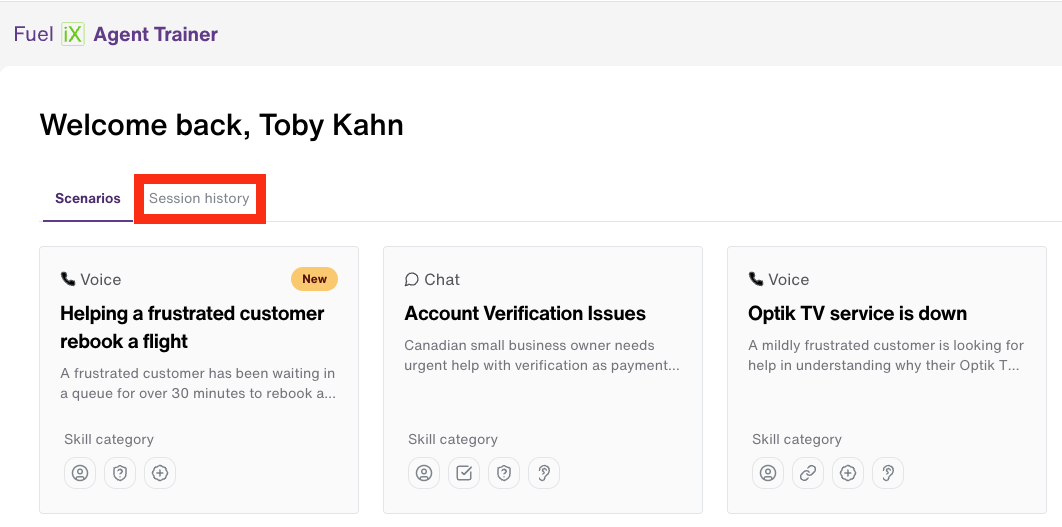
By reviewing your past evaluations, you can track your progress and identify areas for improvement. To view past sessions, navigate to the home page, you can do this by clicking the "Fuel iX" logo in the top left. In the top left of the page there are two tabs: "Scenarios" and "Session History". Clicking "Session History" will bring you to a page where you can view the full history of past training sessions you've completed. Click into one to view the evaluation.
Updated 12 months ago