
User Management (Admin)
User Management (Admin)
Admins can set up and manage their organization, including creating teams, inviting users, and assigning roles. User access is invite-based — new users receive an email.
https://app.fuelix.ai/en/dashboard
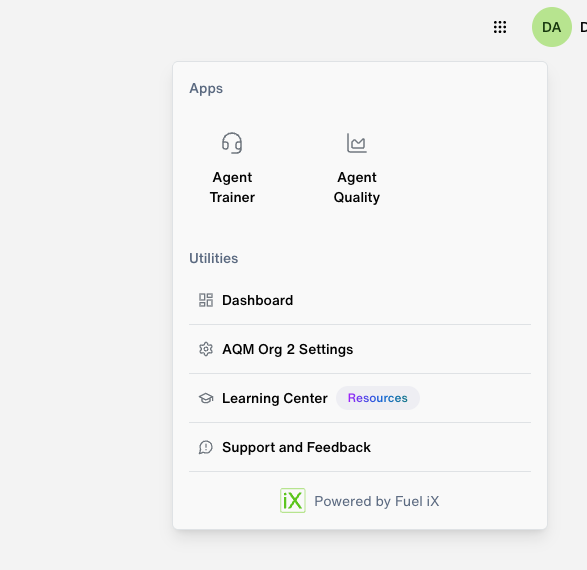
You can see the Dashboard with the apps you have permissions/ enabled
Then you can click on the Dots on the right top corner to go to your Org Setting
Note: To get access to your org and get moving you need to be added by Super Admin frist.
Organization Structure
Org
└── Teams
    └── Users (Admin / QA Manager / Agent)
Roles Overview
| Feature | Admin | QA Manager | Agent |
|---|---|---|---|
| Create / manage teams | ✅ | ✅ (Beta) | ❌ |
| Invite / manage users | ✅ | ✅ (Beta) | ❌ |
| Team visibility | All teams | Own team(s) only | ❌ (Beta) |
| View team evaluations & scores | ✅ All teams | ✅ Own team(s) only | ❌ |
| Manage Skills (org-wide) | ✅ | ❌ | ❌ |
| Manage Evaluation Rubrics (org-wide) | ✅ | ❌ | ❌ |
| View own evaluation scores & skills | ❌ | ❌ | ✅ |
| Access billing / org settings | ✅ | ❌ | ❌ |
Beta note: In the current Beta release, Admin and QA Manager share the same privileges. Role distinction will be enforced in a future release.
Teams
Admins (and QA Managers in Beta) can create and manage teams within the org.
To create a team:
-
Go to ** Team Management from the Left Panel

-
Click Create Team
-
Enter a team name and click Save
To manage a team:
- Add or remove users from **Team Management -> Select Team Name ->Click on 3 dots at the end and select Edit Team from Actions
- Add /Delete Users from the same view
Adding New User
- Go to **Manage User
- Enter **Name/Email
- Assign a role —
Admin,QA Manager, orAgent - Click **Add
The invitee receives an email with a signup link valid for 72 hours.
Roadmap — Role Distinction (Next Phase)
In an upcoming release, QA Manager privileges will be scoped down from Admin. Planned distinction:
| Capability | Admin | QA Manager (Next Phase) |
|---|---|---|
| Manage org-wide Skills | ✅ | ❌ |
| Manage org-wide Evaluation Rubrics | ✅ | ❌ |
| Access billing / org settings | ✅ | ❌ |
| Manage other teams | ✅ | ❌ |
| Manage own team | ✅ | ✅ |
| Invite users to own team | ✅ | ✅ |
Updated 6 months ago