
Skill Breakdown CSV Export on the Overview Page
New feature that adds a full skill-by-skill breakdown to the session CSV export, along with date range and agent filters on the Overview page.
Overview
Previously, managers could only see an agent's overall session score in the export, with no way to review performance at the skill level without opening each session individually. This update adds skill-level detail directly to the CSV export and gives managers control over exactly which agents and time period are included.
The update includes:
- Three new columns in the CSV export: Skill, Skill Grade, and Skill Feedback
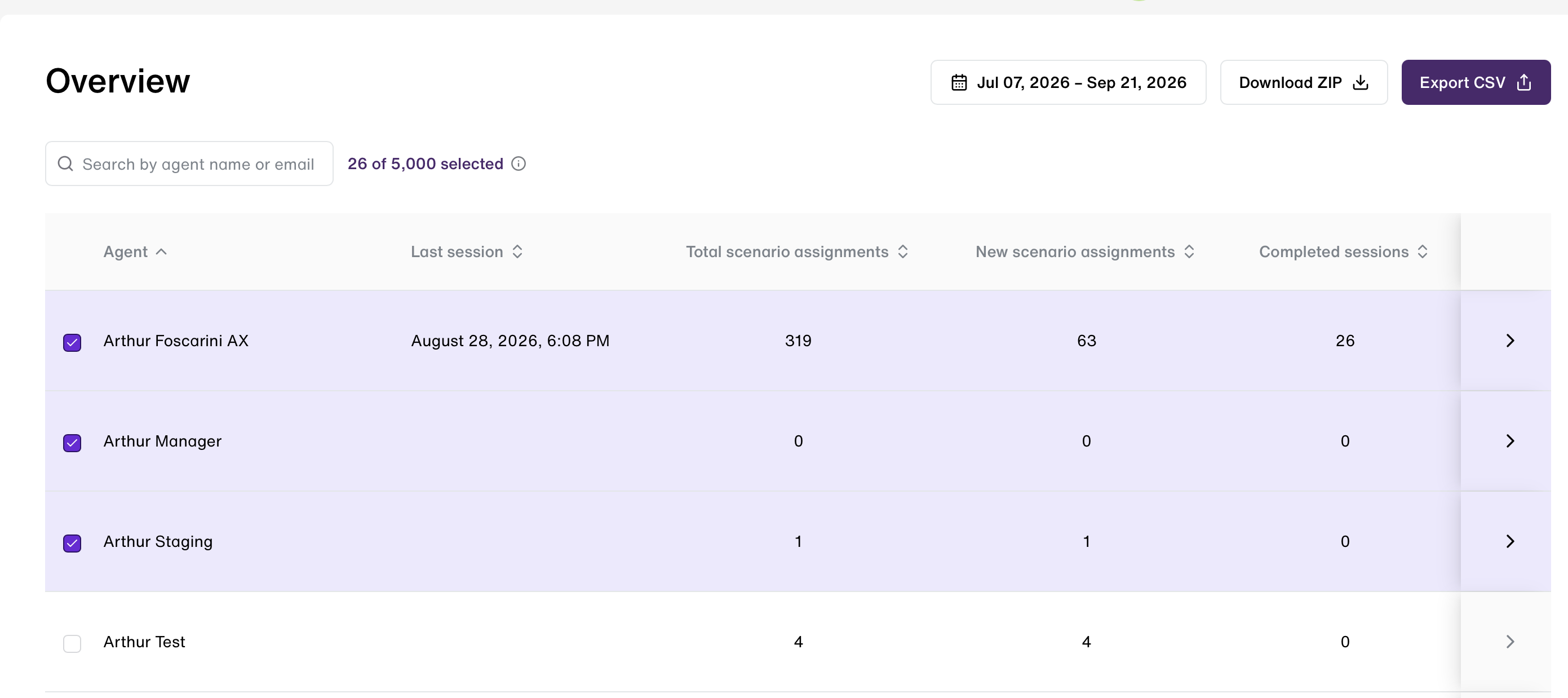
- A date range filter and agent selection on the Overview page to control what gets exported
- All existing session-level columns remain unchanged: Agent Name, Agent Email, Scenario Title, Scenario Type, Scenario Score, Completion Date, Evaluation URL
- Session-level and skill-level data stay together in a single sheet — no separate tabs
How It Works
- The user logs in with an admin account.
- On the Home (Overview) page, the user locates the Export CSV button.
- Clicking it without changing any filters exports data for all agents within the date range currently shown.
- To narrow the export, the user adjusts the filters before clicking Export CSV:
- Agent filter — select one or more specific agents.
- Date range filter — select a specific period.
- The downloaded CSV includes, for every session in scope, both the session-level columns and one row per skill evaluated in that session, with its Skill, Skill Grade, and Skill Feedback.
⚠️ Important: Completed Evaluations Only The export only includes completed evaluations, keeping the file clean and audit-ready.
Updated 1 day ago
Did this page help you?